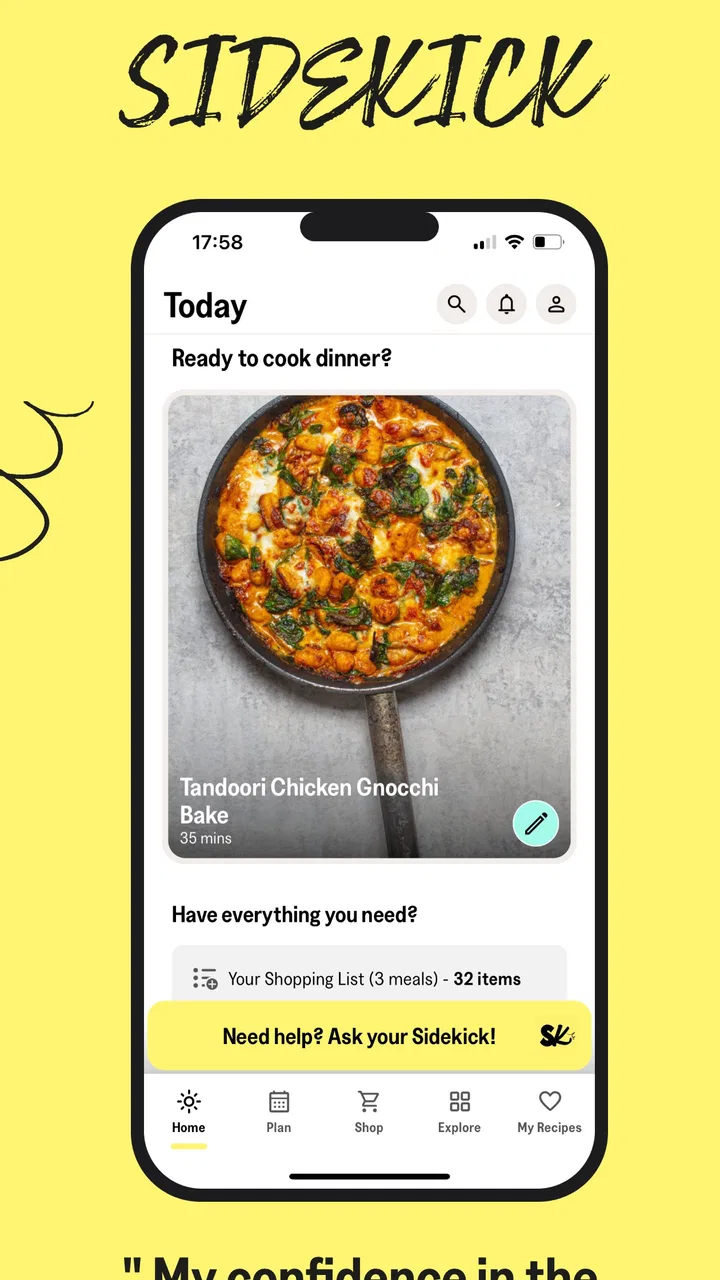
Sidekick by Sorted Food
- 4.3
- Rating
- 100.00K
- Installs
- Free
- Price

 Analysis by App-foxy
I tried Sidekick by Sorted Food as the sort of cooking companion you open when dinner is still an idea rather than a plan. It belongs to the Food & Drink category, and its purpose is practical: help home cooks decide what to make, gather what is needed, and feel less uncertain when standing in front of the fridge. My first impression was that it is less about showing off complicated recipes and more about reducing the small decisions that make cooking feel like work.
That distinction matters. There are countless recipe apps that are enjoyable for browsing but less useful at six o’clock on a busy evening. Sidekick aims at the gap between inspiration and action. Instead of asking me to search endlessly, compare several dishes, and build a shopping list from scratch, it frames cooking as a guided routine. The real test is not whether the app feels exciting during the first few days, but whether it still removes friction after the novelty wears off.
Sorted Club is the developer behind the app, which is available free of charge for an Everyone-rated audience. It has built a respectable audience, with more than one hundred thousand installs and an average rating of 4.3 from roughly two thousand ratings. The app first appeared on November 6, 2019, and the current version is 3.5.0, supporting devices running Android 7.0 or later. Those details make it accessible to many older Android phones, although the experience will naturally depend on the device and operating system you use.
You May Also Like

 Blood Strike: 2.5 Anniversary
Blood Strike’s Loadouts Turn Every Drop Into a Tactical Gamble
A close look at Blood Strike’s custom loadouts: how fast access to signature weapons reshapes its battle royale rhythm, rewards preparation, and narrows the gap between fights.

 Pandora - Music & Podcasts
Pandora’s Music Is Easy to Start, but Harder to Recover
Pandora’s strength is its low-effort path from a seed to a station. Its weak spot is how much confidence it asks you to place in connection, setup, and quiet recovery.

 8 Ball Pool
 Is Built on Rivalries, Rematches, and Routine
A close look at the rivalries, rematches, shared routines, and unanswered safety questions that turn a quick pool match into a persistent mobile community.

 Samsung Music
’s Quiet Strength Is Playing What You Already Own
Its reach comes less from spectacle than from dependable access to a personal library. That simplicity is both the app’s strongest retention engine and its ceiling.

 AccuWeather: Weather Radar
AccuWeather Review: A Quick, Clear Forecast for Everyday Decisions
For everyday plans, the best forecast is the one you can understand quickly. AccuWeather makes rain timing, radar, and local conditions easy to act on, with a few trade-offs.

 Hill Climb Racing
Why Hill Climb Racing Still Turns Crashes Into One More Run
A tiny car, a bumpy hill and one more upgrade: Hill Climb Racing keeps resurfacing because its simple chaos makes every near-miss feel personal.
More From Our News Desk
View All News


What Sidekick feels like during the first week
The strongest part of the early experience is the feeling of having a direction. A normal recipe search usually begins with a vague question: what can I cook with what I have? That often leads to too many tabs, ingredients that are difficult to find, or recipes that look simple until the preparation begins. Sidekick is more useful when I want a manageable answer rather than an endless catalogue.
For a new cook, that guidance can be reassuring. The app’s central promise is not that every meal will be effortless, but that the route from choosing a dish to preparing it should feel clearer. I found that especially helpful on evenings when I had enough energy to cook but not enough patience to plan. A focused recipe path makes it easier to commit instead of falling back on takeaway food or repeating the same familiar meal.
The first week is also when the app’s tone has the most impact. A beginner-friendly cooking service needs to make mistakes feel recoverable. Sidekick works best when I treat it as a calm companion rather than an authority judging my technique. That mindset is important because confidence does not come only from successful dishes; it comes from understanding what to do next when timing slips, an ingredient is unavailable, or the result looks different from the picture.
One useful way to test it is to begin with a normal weekday rather than a special occasion. I might open the app after work, choose a recipe that fits the time and energy I have, check the ingredients before leaving for the shop, and then keep the recipe available while cooking. This workflow is more realistic than testing it with a leisurely weekend meal. If the app can help me make a decent decision on a tired Tuesday, it has earned more than temporary curiosity.
My advice for the first few uses is to avoid trying to build an ideal cooking identity around it. Do not select ambitious meals simply because they look impressive. Start with recipes that match your existing comfort level, then notice where the app genuinely saves effort. That reveals its practical value more accurately than choosing something elaborate and blaming the tool when the evening becomes stressful.
Where the planning approach helps
Sidekick is particularly appealing for people who dislike meal planning but still want to cook at home. The difference between “I should cook more” and actually cooking is often a sequence of tiny tasks: choosing meals, remembering ingredients, shopping efficiently, and deciding what to do first. By bringing those tasks into one cooking-focused experience, it can make the habit feel less demanding.
It is also a sensible option for someone moving beyond a handful of dependable dishes. Traditional cookbooks are excellent when I already know what I want, while search engines are useful when I have a very specific ingredient or dietary question. Sidekick sits between those choices. It encourages exploration without requiring me to compare dozens of unrelated results.
There is a trade-off, though. A guided system is less satisfying when I want complete freedom. If I already have a precise recipe in mind, or if I am trying to use a very unusual leftover, a general search tool may get me to an answer faster. Sidekick’s value appears when I want help deciding and organizing, not when I want to ignore structure and improvise from whatever is in the cupboard.
A realistic dinner routine
Imagine a household where two people arrive home at different times. One person has twenty minutes to shop, while the other can start preparing food. Sidekick can act as a shared reference point: the shopper checks the required ingredients, and the cook follows the recipe rather than sending a string of messages about quantities and steps. That will not solve every coordination problem, but it reduces the need to make a second plan from memory.
For a single person, the benefit is different. The app can help prevent overthinking and make it easier to decide whether a meal is worth the ingredients and effort. I would still check how much food I actually need before shopping, especially if leftovers are unlikely to be eaten. A recipe planner can simplify choices, but it cannot know perfectly how hungry I will be, how much storage space I have, or whether I will be home tomorrow.
Families may appreciate the confidence-building angle, particularly when one person usually carries the responsibility for dinner. A guided recipe can make it easier for another household member to take over a meal. The important limitation is that the app does not replace communication about allergies, dislikes, budgets, or equipment. Those decisions remain personal and should be made before committing to a recipe.
Does it keep earning a place after the first month?
The first-week appeal is easy to understand: Sidekick gives cooking a sense of momentum. The more important question is whether that momentum becomes a repeatable habit. In my view, the app has lasting value when I use it as a weekly planning aid rather than opening it only when I feel inspired.
A useful monthly rhythm would be to choose a small set of meals, shop with a clear intention, and return to the app when I need a nudge toward something different. This makes the service part of a routine instead of another source of content to browse. The app is not at its best when I scroll through recipes for entertainment and then cook nothing. Its recurring value comes from converting a decision into an actual meal.
That makes it a better fit for people who want structure around home cooking. Someone trying to reduce last-minute food purchases may find the planning support worthwhile. A beginner who wants to expand their repertoire can use it as a progression tool, repeating familiar techniques until they feel natural before moving on. Even an experienced cook may benefit on busy weeks when creativity is not the problem; decision fatigue is.
However, I would not depend on it as my only source of food knowledge. Long-term cooks need more than a stream of guided meals. I still want a reliable way to look up a specific technique, substitute an ingredient, scale a recipe, or understand why a method works. Sidekick is strongest as a practical companion for choosing and making food, not necessarily as a complete culinary reference library.
The habit is more important than the catalogue
One of the less obvious lessons from using an app like this is that the number of recipes matters less than the quality of the routine around them. If I open it without knowing when I plan to shop or cook, it can become another place to postpone a decision. If I use it at a fixed point in the week, it has a clearer job and is easier to judge.
I would create a simple personal rule: open Sidekick before shopping, not while already hungry. That small change prevents me from choosing meals based only on immediate cravings. It also gives me time to notice whether the ingredients overlap with what I already own. The app can help organize the plan, but I still need to protect myself from buying more food than I will realistically use.
Another useful approach is to repeat a recipe before deciding whether it belongs in the regular rotation. A first attempt may include awkward timing because I am still learning the sequence. On the second attempt, I can tell whether the dish is genuinely convenient or merely interesting. This is where Sidekick’s long-term usefulness becomes personal: it can introduce options, but I decide which ones deserve recurring space in my kitchen.
Where the maintenance burden appears
Every planning app creates some maintenance, even when it promises to simplify life. I still have to open it, make choices, check the shopping requirements, and adapt the plan when the week changes. If I skip that step, the app cannot prevent an unplanned dinner. This is not a flaw unique to Sidekick, but it is important to understand before expecting automation.
The burden is lowest when my schedule is predictable. A weekly routine makes it easier to choose meals and shop once with purpose. It becomes higher when plans change frequently, when several people have different preferences, or when I cook from leftovers without knowing what will be available. In those situations, a flexible notes app, a basic shopping list, or a quick search may be faster than rebuilding a plan.
Ingredient management also requires common sense. I would not assume that selecting a recipe automatically solves portion planning, pantry organization, or food waste. Before shopping, I would check cupboards, consider substitutions I am comfortable making, and remove anything I already have. That extra minute is a concrete way to prevent the convenience of guided planning from becoming unnecessary spending.
There is also a mental maintenance cost. A meal-planning app can make cooking feel like a project that must be optimized. I found it healthiest to use Sidekick as a fallback for uncertain evenings, not as a rulebook for every meal. Some nights, a sandwich or leftovers are the sensible choice. A useful cooking companion should support that reality rather than make a simple dinner feel like a failed plan.
What may cause fatigue over time
The biggest source of fatigue is repetition in the planning experience. Even a good recipe collection can start to feel predictable if I use it without changing my goals. I might initially enjoy being guided, then begin wishing for more control over ingredients, preparation time, or the style of food I want. That is the point where a broad recipe search or a favorite cookbook may feel more refreshing.
Another possible frustration is the gap between a recipe’s apparent simplicity and the reality of my kitchen. Preparation speed depends on knife skills, equipment, workspace, and whether ingredients are already prepared. A confident cook can move quickly, while a beginner may need more time than expected. I would leave a buffer rather than planning a meal around the shortest possible estimate.
People with strict dietary requirements should also be selective. The app may be useful for general inspiration, but I would personally verify every ingredient and preparation detail when allergies, medical restrictions, or cross-contamination concerns are involved. A friendly guided experience should not replace careful label checking or professional dietary advice.
Cost can become part of the long-term decision as well. The app itself is free, but it includes in-app purchases ranging from $5.49 to $104.99 per item. That wide range means I would pay close attention to what is included before buying anything. The free entry point makes testing straightforward, yet anyone considering a purchase should decide whether the extra value supports a habit they already have, rather than paying simply because the first week felt new.
For households with a tight budget, the best way to use it is selectively. Choose recipes that share ingredients, plan around what is already at home, and treat suggested meals as ideas rather than a mandatory shopping list. If the app encourages buying several one-use ingredients every week, it may work against the savings a person hoped to achieve. Its planning value depends on how thoughtfully I translate the suggestions into my own kitchen.
Who should use it, and who should choose something else?
I would recommend Sidekick to a beginner who wants confidence without having to design a complete cooking system. It is also well suited to busy home cooks who know they want more variety but repeatedly lose time deciding what to make. People who cook for a partner or family may appreciate having a shared starting point, especially when one person is trying to take more responsibility for meals.
It is less convincing for someone who already has a dependable meal plan, a well-organized recipe collection, or a strong habit of improvising. If I know exactly what I am cooking and keep my own shopping list, another guided layer may feel unnecessary. The same is true for cooks who enjoy adapting recipes more than following them. A flexible cookbook or general search tool will usually offer more freedom.
I would also hesitate to make it the main tool for complex dietary planning, highly specialized cuisines, or a household with many changing restrictions. In those cases, the convenience of a curated path may be outweighed by the need to inspect every detail. Sidekick can still provide inspiration, but it should sit alongside more precise resources rather than replace them.
Compared with a traditional cookbook, it feels more active and easier to use when I do not know what I want. Compared with a basic notes app, it offers more cooking direction but less personal flexibility. Compared with searching the web, it can reduce the noise of too many choices, though search remains better for unusual ingredients and highly specific questions. That middle position is its clearest identity.
My long-term verdict
After the initial novelty fades, Sidekick earns its place when I use it to protect a cooking habit from everyday indecision. It is not magic, and it does not remove the need to shop thoughtfully, check ingredients, or adjust recipes to real life. What it does well is give an uncertain cook a practical next step and turn meal planning into something that feels possible.
I like it most as a weekly reset: choose a few realistic meals, check what is needed, and approach the kitchen with less hesitation. I would not open it for every single meal, and I would not pay for additional content without first proving that I return to the app consistently. That is the key trade-off. Its value grows through repeated use, but repeated use requires a routine that remains flexible enough for busy weeks.
The free price makes trying it low-risk, while the Everyone rating keeps it approachable for a broad audience. The established release history and current 3.5.0 version suggest an app that has had time to develop beyond a brief experiment, and its 4.3 average shows that many users find the concept worthwhile. Still, those figures matter less than whether its guided approach matches the way I cook.
My final recommendation is simple: give it a fair trial during an ordinary week, not just a relaxed weekend. Use it before shopping, choose meals that fit your actual energy level, and judge it by whether dinner becomes easier to start and easier to repeat. Sidekick is worth keeping when it reduces decisions without taking away your freedom; it is not worth keeping if its planning becomes another task to maintain.
For me, that balance is favorable. I would recommend it to a friend who wants to cook more often but keeps getting stuck at the planning stage. I would frame it as a supportive structure, not a complete replacement for personal taste, dietary judgment, or basic kitchen knowledge. Used that way, Sidekick by Sorted Food has a reasonable chance of surviving beyond its first-week appeal and becoming a useful part of a realistic home-cooking routine.
FAQs for Sidekick by Sorted Food
01What is Sidekick by Sorted Food?
Sidekick by Sorted Food is a meal-planning and recipe app designed to make home cooking easier and less repetitive. It provides guided recipe packs, usually organized around a small set of meals that share ingredients, helping reduce food waste and simplify shopping. The app is aimed at both beginners and experienced cooks who want practical ideas and clearer preparation guidance.
02Does Sidekick by Sorted Food create a shopping list for recipes?
Yes. One of Sidekick’s most useful features is its integrated shopping-list system. After selecting a recipe pack, the app combines the required ingredients into a single list, which can make grocery shopping faster and more organized. Quantities are generally adjusted for the number of servings, although you should still check your pantry and review the list for substitutions or items you already have.
03Is Sidekick by Sorted Food free to download and use?
The app may be available to download at no initial cost, but access to its complete recipe library and planning features can depend on a subscription or other in-app purchase terms. Pricing, trial availability, and renewal conditions may vary by country and platform. Before starting a trial, review the current App Store or Google Play listing and the subscription details shown inside the app.
04Can beginners use Sidekick by Sorted Food comfortably?
Yes, Sidekick is particularly suitable for beginners because its recipes are presented as guided cooking experiences rather than simple ingredient lists. Instructions are broken into manageable steps, and the meal packs help you plan several dishes at once. However, cooking times and difficulty can still vary, so reading the complete recipe before starting and preparing ingredients in advance is recommended.
05Does Sidekick support dietary preferences and ingredient substitutions?
Sidekick includes recipes designed around different cooking styles and may offer options suitable for various dietary preferences, but you should not assume that every recipe meets a specific allergy or medical requirement. Always inspect the full ingredient list, allergen information, and substitution guidance before cooking. Available filters, alternatives, and recipe collections can also differ depending on the app version and region.
Pros
- Personalized recipes help reduce food waste and use what you already have.
- Clear step-by-step guidance makes cooking easier for less experienced users.
- Meal planning can simplify shopping and organize busy weekly routines.
- Recipes are supported by Sorted Food’s practical cooking knowledge and testing.
- Useful inspiration for trying new dishes without searching across multiple websites.
Cons
- Many of the best features require a paid subscription after the trial period.
- Recipe suggestions may not suit every dietary restriction or regional ingredient list.
- Some recipes require ingredients or equipment that are not always easy to find.
- The app may feel unnecessary if you already have a reliable meal-planning system.
- Personalization depends on entering accurate preferences
- pantry items
- and cooking habits.

Sidekick by Sorted Food
Gallery